Server-side tagging comes up in almost every GTM audit I run these days — usually framed as a silver bullet: “just move everything server-side and your data problems disappear.” It’s not a silver bullet. It solves a specific set of problems very well, and does nothing at all for others. Here’s the honest framework I use to decide.
What server-side tagging actually is
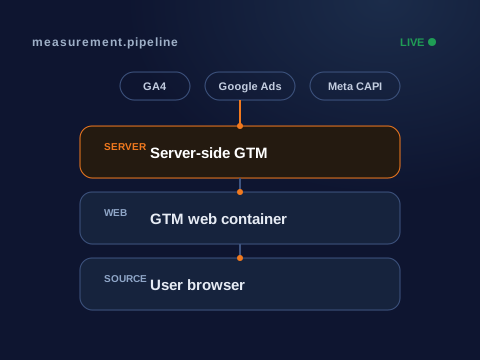
In a normal (client-side) setup, tags fire in the visitor’s browser. GA4, Google Ads, Meta Pixel and every other script load on the page and send data directly to those platforms. Server-side tagging inserts a container you control — typically running on Google Cloud on your own subdomain, like gtm.yourdomain.com. The browser sends one request to your server; your server decides what to forward, to whom, and with what data attached.
What it genuinely fixes
- Ad-blocker and ITP loss. Requests to a first-party endpoint you own are far harder for blockers and browser privacy features to strip than requests to
google-analytics.com. - Cookie lifespan. First-party cookies set server-side survive Safari’s 7-day cap that kills client-side
_gacookies. - Page performance. Heavy vendor scripts move off the page, so the browser does less work and Core Web Vitals improve.
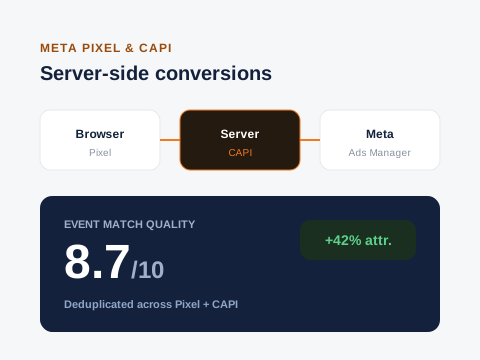
- One clean control point. You can enrich, deduplicate, filter and reshape events in one place before they ever reach GA4, Ads or Meta CAPI.
What it does NOT fix
- A messy dataLayer — garbage in is still garbage out, just relocated to a server.
- Consent handling — you still need Consent Mode v2 configured correctly upstream.
- Attribution gaps from platform-level privacy changes that are outside your domain entirely.
If ad-blocker loss is above ~8–10% of sessions, or you’re spending real money on paid social you can’t verify, server-side is very likely worth it. If your core problem is inconsistent events or missing triggers, fix the client-side setup first.
What it costs
Be realistic about the trade-off. You’re taking on a Google Cloud hosting bill (usually modest — tens of dollars a month for most sites, more at high traffic), a more complex debugging surface, and ongoing maintenance. For a small brochure site with light traffic and no paid media, that overhead rarely pays for itself. For an ecommerce store or a lead-gen business spending on ads, it usually pays for itself within weeks in recovered, trustworthy conversion data.
How I approach it
I never move a client to server-side before the client-side foundation is clean. The sequence is always: audit and fix the dataLayer and events, validate everything in DebugView, then stand up the server container and migrate tag by tag — measuring loss recovery at each step so we can prove the value rather than assume it.